
Add/Edit Squeeze Pins
Create and edit squeeze pins.
- Click the Casting tab.
-
Click the Components icon.

-
Click the Squeeze Pin icon.

Then select a point on the model.A squeeze pin is created. -
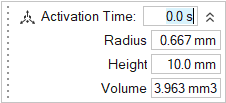
Use the microdialog options to adjust the size and position of the squeeze pin,
and change its activation time.
- Right-click and mouse through the check mark to exit, or double-right-click.
Microdialog Options
Adjust the size and position of the part of the squeeze pin that will penetrate the liquid and define its activation time.
| Option | Description | |
|---|---|---|
| Move |
 |
Click to move the squeeze pin. |
| Activation Time | Enter the time the squeeze pin will activate, in seconds from the start of the solidification phase. | |
| Radius | Change the squeeze pin's radius. | |
| Height | Change the squeeze pin's height. | |
| Volume | Change the squeeze pin's volume. | |