Apply Flux Loads
Create concentrated fluxes by applying a load, representing fluxes, to element nodes.
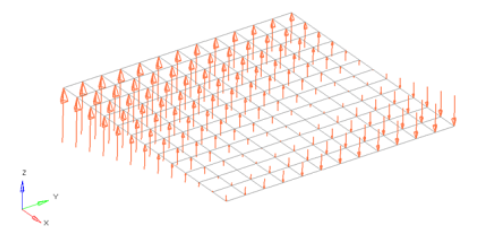
Fluxes are load config 6 and are displayed as a thick arrow labeled with the word "flux".
-
From the Analyze ribbon, click the Flux tool.
図 1. 
-
Select the keyword to create from the Load Type menu.
The available types depend on the current solver interface.
-
Select entities to which temperatures will be applied.
In any case, the forces are applied to nodes; this selection simply determines how those nodes are selected. For example, elements select the nodes at the corner of each element picked.
-
Specify the magnitude and direction of the temperature.
- Constant Value
- The value of the load magnitude.
- Curve
- Select a curve, then specify the value (y scale) to apply to the curve. Optionally, you can enter an xscale if your solver supports it.
- Equation
- Specify the loading equation. Use the plane and vector tool to specify a direction, then select the coordinate system to which the vector corresponds.
- Field Loads
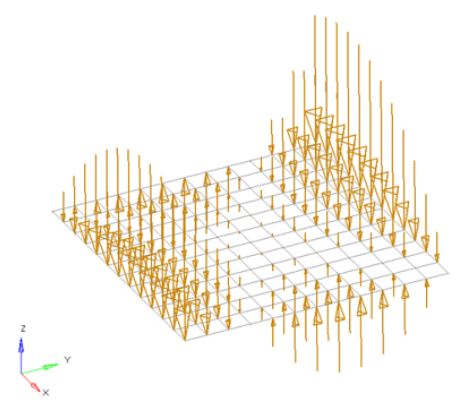
- Interpolate and extrapolate loads from existing loads. You can then select the desired elements to which you wish to add loads, and any existing loads on which you wish to base additional forces.
- Linear Interpolation
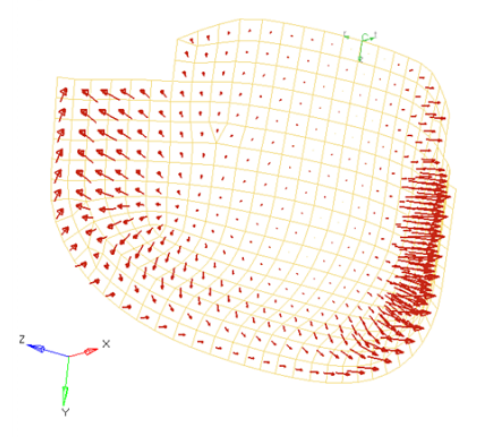
- Interpolate loads from a saved file or existing loads.注: Only available for shell elements.
- You can then select the desired nodes to which you wish to add
loads, and pick 3 or more existing loads that enclose those nodes.
When you interpolate, a linear function is used to create additional
loads on the selected nodes, with magnitudes based on the magnitudes
of the loads that you had selected.
図 2. 
Loads from files formatted as CSV (Comma Separated Values) or SSV (Space-Separated Values) text files can be interpolated.
Field Loads will not overwrite any existing loads, so you can create an area of loads via linear interpolation and then use field loads to expand the load area without changing the loads already inside of the area.
- If working in a controller, click Create.
Equationの指定によって、集中荷重、モーメント、荷重、温度、流束などを、適用するエンティティの座標値によって変化する荷重量を定義できます。このような荷重の例としては、適用点からの距離によって変化する温度の適用や内部の流体の高さによって変わるコンテナの壁にかかる圧力などが考えられます。